Power adapters can draw electricity even when no device is charging. The load may be invisible, but the adapter stays warm in the wall. Across many homes and offices, small, continuous losses deserve attention. The challenge is separating meaningful savings from claims that sound better than they measure.
A useful benchmark comes from the European Commission’s external power supply ecodesign requirements, Regulation (EU) 2019/1782. For qualifying single-voltage AC-to-DC adapters, the permitted no-load power is up to 0.10 watts for units rated at 49 watts or less, and 0.21 watts for units above 49 watts up to 250 watts. These are product limits, not estimates of every household’s savings. They show why adapter design and operating conditions matter.
This guide presents seven practical ways to Minimize standby power consumption of power adapters, from unplugging idle units to choosing efficient replacements and checking real-world draw. A plug-in power meter can reveal whether an adapter uses measurable power with no device attached. Still, inexpensive meters may struggle to read very low wattage. That uncertainty is easy to overlook. The recommendations focus on simple actions, credible benchmarks, and sensible measurement—not dramatic promises. Some habits take effort, and unplugging every adapter may not suit every room. A better approach is to identify the units that remain connected for long periods and start there.
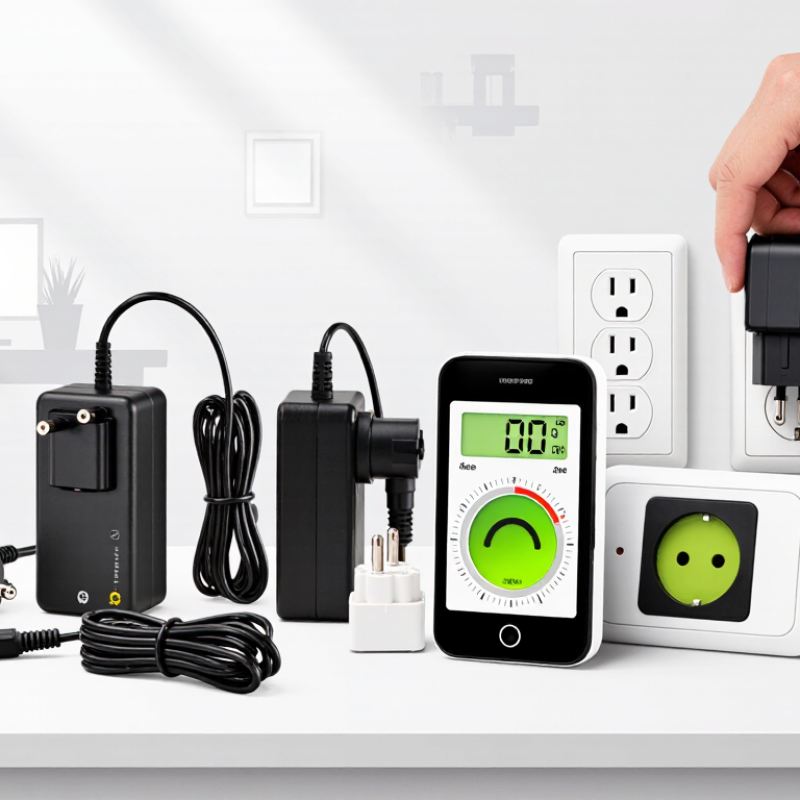
Standby power is electricity an adapter draws while plugged into an outlet but not actively charging a device. Even without a phone attached, internal control circuits may remain energized. Not zero. An indicator light can also use energy, though the adapter’s conversion circuitry is usually the main consideration. Consumption varies with design, age, and input voltage. An adapter’s output rating does not reveal its idle draw.
A plug-in energy meter can help measure that draw. Let the reading settle, and check the meter’s resolution; inexpensive models may not register very low wattage reliably. Compare the adapter alone with the adapter connected to a fully charged device. These are different operating states. Unplugging stops the adapter’s draw, while a switched power strip can make that easier for several chargers.
Energy accumulates over time: watts multiplied by hours gives watt-hours. For example, a 0.2-watt idle draw over 24 hours equals 4.8 watt-hours. That is modest for one adapter, but several left connected year-round contribute more. It is easy to overstate the effect. Measure before replacing a working adapter, and pay closer attention to chargers that stay plugged in continuously.
To identify which adapters use power when idle, test them one at a time with a plug-in energy meter. Leave the adapter connected to the meter, but disconnect the device it normally charges. Check that the meter is set to watts, then note the reading after it settles. Wait a minute. Some adapters draw a small amount of standby power, while others show a reading below the meter’s display threshold.
Compare adapters under the same conditions, using the same outlet and meter. An adapter with a light or display may use power to keep that feature running, but appearance alone is not proof. A warm casing is not a dependable test either; temperature can reflect recent use. I would treat one quick reading as a clue, not proof. If the display jumps between values, record the range and repeat the test. Also check whether a connected cable or accessory changes the result, since some devices can draw power even when they seem switched off. Meter accuracy matters here: inexpensive models may miss very low loads, so a zero reading does not always mean zero consumption.
A power adapter may use a small amount of electricity when it is plugged in but not charging a device. The exact standby draw varies with its design and condition. One adapter may make little difference, but several left in sockets can add up over time. Unplugging an adapter you no longer need stops its standby use. It also frees a socket. A simple habit.
After charging a phone, tablet, or rechargeable lamp, check whether the adapter is still connected to the wall. Grip the plug body and pull it straight out; avoid tugging on the cable. Keep adapters easy to reach, rather than hidden behind furniture, so unplugging them does not become a chore. I still forget sometimes, especially when I am rushing out. A visible charging spot near an accessible outlet can make the routine easier.
You do not need to unplug equipment that must remain powered, such as a router or a device scheduled to charge overnight. For adapters used only occasionally, disconnecting them between uses is practical. Check the plug and cable now and then for looseness, damage, or unusual warmth, and stop using an adapter that seems faulty. The savings from one small adapter may be modest. Repeated daily, the habit is more meaningful.
This illustrative estimate assumes each idle adapter draws 0.1 watts continuously. Unplugging 1, 5, 10, or 20 adapters for a full year would avoid approximately 0.88, 4.38, 8.76, or 17.52 kWh of electricity use, respectively. Actual standby power varies by adapter.
A switched power strip makes idle adapters easier to control. One switch can disconnect a group of chargers, speakers, and small electronics after use. This matters because some adapters continue drawing power while plugged in, even when their devices are off. The International Energy Agency’s 2001 report, Things That Go Blip in the Night, estimated standby power could represent 5–10% of household electricity use in OECD countries. That is a historical estimate, not a prediction for every home today. Actual savings depend on the devices and how long they stay connected.
Place the strip where its switch is easy to reach, such as beside a desk or behind a television stand. Plug only devices that can safely lose power together into switched outlets. Keep equipment that needs continuous power, such as a router or a device undergoing updates, on a separate outlet. Check the strip’s rated load, too. A neat bundle of adapters can still exceed its limit. Small loads add up. But switching off everything blindly can create inconvenience or interrupt useful functions.
Tips: Try a plug-in energy meter on a few adapters before and after switching them off. Note the readings overnight, when the devices are otherwise idle. Label each switch if several groups share the strip. The results may look modest; that is useful information, not a failed effort.
Choosing an efficient adapter starts with its no-load power, not just its charging speed. Check the label or manufacturer’s technical sheet for standby or no-load watts. ENERGY STAR’s external power supply criteria include no-load efficiency testing, offering a useful comparison point. The IEA’s 2001 report, Things That Go Blip in the Night, estimated standby use at roughly 5–10% of household electricity in OECD countries. That figure is dated and broad, not a prediction for every home. Still, it shows why small, persistent loads deserve a check.
Tips: Use a plug-in energy meter that can read low wattages. Measure an adapter with nothing connected, then multiply watts by 8,760 hours and your electricity rate. For example, a 0.3-watt idle draw uses about 2.6 kWh per year. At $0.20 per kWh, that is roughly 53 cents. Check meter accuracy at low readings; inexpensive meters can be imprecise.
Compare several adapters before replacing anything. A single unit may save only pennies, and buying a new adapter solely for standby savings may not pay back quickly. The result changes when several chargers stay plugged in all year. Unplug idle units or switch off a power strip when convenient, then compare a week of meter readings. It is a small test, but it replaces assumptions with evidence.
| Method | What to Do | How to Check | Illustrative Annual Savings per Setup |
|---|---|---|---|
| Unplug adapters that are not in use | Disconnect an adapter when its device is removed or no longer needs power. | Use a plug-in energy meter to measure the adapter’s input draw while idle; unplugging it removes that draw. | 0.5 W eliminated continuously: 4.38 kWh, about $0.70 |
| Use a switched outlet or power strip | Switch off the outlet when connected devices are idle for a predictable period, such as overnight. | Compare the meter reading with the outlet on and off. Include all devices connected to the strip in the check. | 0.5 W off for 8 hours/day: 1.46 kWh, about $0.23 |
| Choose an adapter with low no-load power | When buying a compatible replacement, compare published no-load or standby input-power figures. | Measure the adapter with its output disconnected, following the meter’s instructions. Confirm the replacement meets the device’s voltage, current, and connector requirements. | 0.5 W reduced to 0.1 W: 3.50 kWh, about $0.56 |
| Set a timer for predictable idle periods | Use a timer to disconnect an adapter during hours when its device does not need power. | Check that the schedule does not interrupt charging, updates, or other required operation; measure the adapter’s draw during the off period. | 0.5 W off for 12 hours/day: 2.19 kWh, about $0.35 |
| Consolidate compatible adapters where practical | Replace multiple always-connected adapters with one suitable multi-output adapter, if the devices’ electrical requirements are compatible. | Measure the old adapters together and the replacement by itself. Compare their combined input power rather than assuming the new adapter uses no standby power. | Two adapters at 0.5 W each replaced by one at 0.1 W: 7.88 kWh, about $1.26 |
| Investigate unusually high idle readings | Use a plug-in energy meter to identify adapters with higher-than-expected no-load draw; consider replacing one only with a compatible, lower-draw model. | Measure under the same conditions before and after replacement, with the device disconnected from the adapter output. | 1.0 W reduced to 0.2 W: 7.01 kWh, about $1.12 |
| Disconnect adapters during long periods of non-use | Unplug adapters for seasonal equipment, spare devices, or other setups that will remain unused for weeks. | Check the calendar or usage routine, then confirm the adapter is disconnected for the full period. | 0.5 W eliminated for 90 days: 1.08 kWh, about $0.17 |
Estimates are illustrative, not guaranteed. They assume a continuous standby load at the stated wattage and an electricity rate of $0.16 per kWh. Annual energy is calculated as watts × hours × days ÷ 1,000; actual results depend on measured adapter draw, usage schedule, local electricity rates, and any power used by timers or switched devices.
It is electricity used while an adapter stays plugged in without charging a device. Internal circuits or an indicator light may still use power. Not quite zero.
Connect it to a plug-in energy meter, with no device attached. Set the meter to watts and wait for the reading to settle. Wait a minute.
Not always. Some inexpensive meters cannot detect very low wattage. A zero on the display may mean the draw is below its measurement threshold.
No. Output ratings describe power supplied during use, not idle consumption. Check technical information for no-load or standby watts instead.
A light may draw some electricity, but appearance alone is not proof. Warmth can come from recent charging. I would treat either clue cautiously.
It uses 4.8 watt-hours over 24 hours. Several adapters left plugged in can add more over time, though one unit’s impact may be modest.
Multiply watts by 8,760 hours, then multiply by your electricity rate. For example, 0.3 watts uses about 2.6 kilowatt-hours yearly, or roughly 53 cents at $0.20 per kilowatt-hour.
Measure it first. One adapter may save only pennies, so replacement may not pay back quickly. Unplug idle units or switch off a power strip when convenient.
Power adapters can continue drawing a small amount of electricity even when they are not charging a device. This standby power may seem insignificant, but several adapters left plugged in can add up over time. To Minimize standby power consumption of power adapters, first identify which ones remain warm, show an indicator light, or otherwise use power while idle. Unplug adapters when they are not needed, especially those connected to devices that are fully charged or used only occasionally.
For convenience, use a switched power strip to turn off several adapters at once, while keeping essential equipment connected separately. When replacing an adapter, look for an efficient model that matches the device’s requirements and avoids unnecessary energy use. You can estimate your savings by comparing usage before and after changing your habits, using an energy meter if available. Small, consistent steps can reduce wasted electricity without making everyday charging less convenient.

JDI Power Supply